
AI-Generated Pull Requests
Designing Idea-to-PR in Amazon CodeCatalyst
Overview
Amazon CodeCatalyst is an end-to-end DevOps platform designed to help teams plan, build, test, and deploy applications on AWS.
As a UX designer on the AWS Developer Tools team, I worked on features related to source repositories, developer workflows, and generative AI.
This case study focuses on a generative AI workflow that allowed developers to describe a task in natural language and receive merge-ready code delivered as a pull request. Internally, our team referred to this capability as “Idea-to-PR”.
Problem
Through customer research and field conversations, we repeatedly heard the same challenge from development teams:
Engineering backlogs were growing faster than teams could address them.
While some work required deep expertise, a large portion of backlog tasks consisted of relatively small implementation efforts such as:
Bug fixes
Small feature additions
Refactoring
Infrastructure or configuration updates
These tasks were important but time-consuming, and teams often struggled to prioritize them alongside higher-complexity work.
This raised an interesting question:
Could generative AI help development teams increase their capacity by handling lower-complexity coding tasks?
Opportunity
Our team explored whether generative AI could function as a junior development assistant within CodeCatalyst.
The hypothesis was straightforward:
If developers could delegate smaller coding tasks to an AI assistant, teams could increase delivery capacity while allowing engineers to focus on more complex work.
The concept we began exploring allowed developers to describe a task in natural language and receive merge-ready code delivered as a pull request.
Designing this experience introduced several challenges. At the time, interaction patterns for generative AI tools were still emerging, and there was little precedent for how developer might collaborate with an AI assistant inside a DevOps platform.
Across AWS, emerging design principles for AI experiences emphasized:
Transparency: Users should understand what the AI is doing
User control: AI should assist, not act unpredictably
Familiar interaction patterns: Minimizing cognitive overhead for new technology
These principles became key guardrails throughout the design process.
Exploration
My first step was to explore potential entry points where developers might engage with an AI development assistant.
Key questions included:
Where should AI work begin in the development workflow?
Should AI act autonomously, or be explicitly directed by a user?
How much visibility should developers have into the AI’s progress?
While exploring interaction patterns from other productivity tools, I mapped early concepts in FigJam and worked alongside an engineer who developed a working prototype.
One promising entry point emerged from CodeCatalyst’s issue management system.
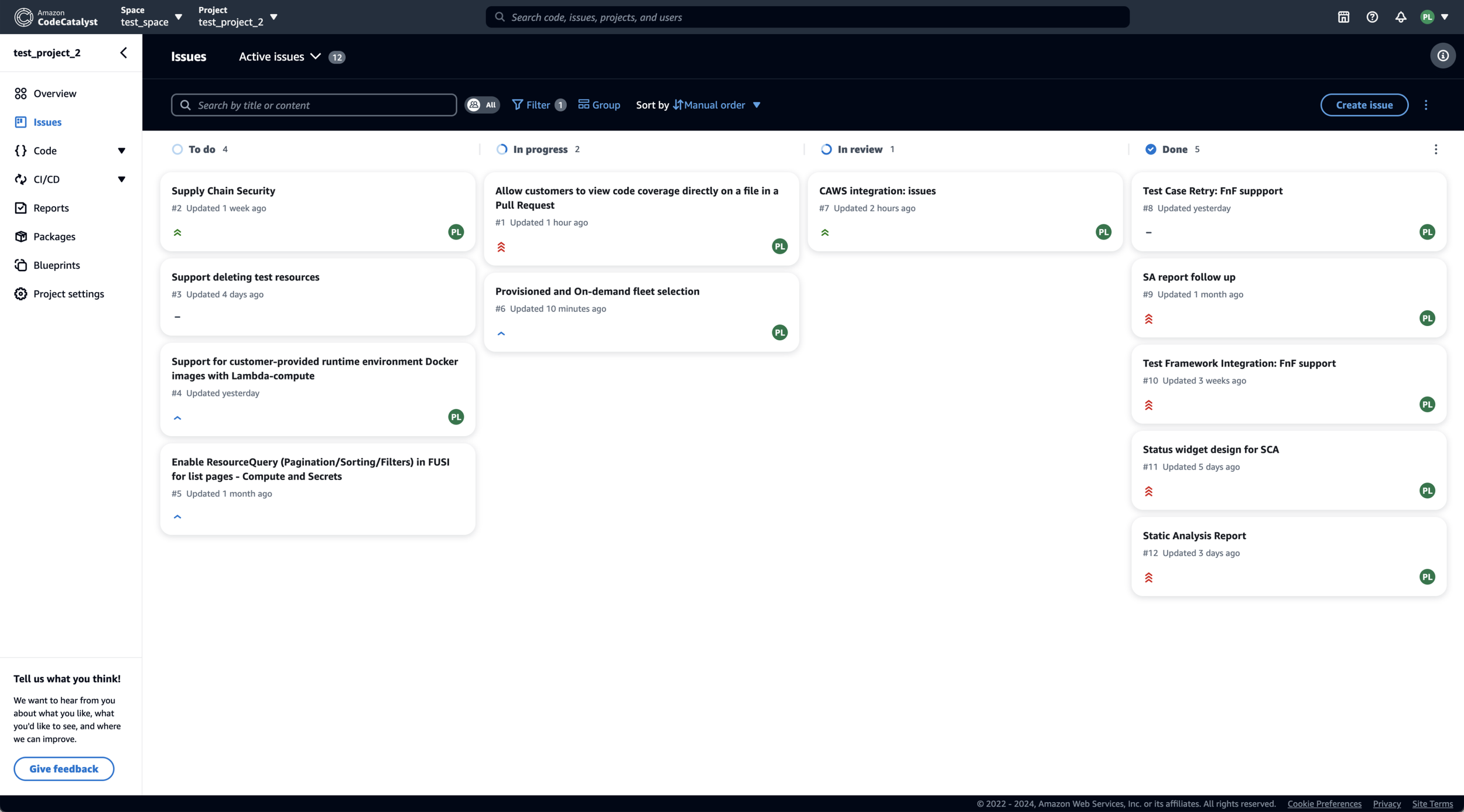
Screenshot from CodeCatalyst’s issues board.
Issues already represented units of work in a development workflow. Starting from an issue provided a natural way for developers, or even non-developers on a team, to initiate AI-assisted work. From there, the AI could generate a plan and ultimately produce merge-ready code delivered as a pull request.
User Research
As the early concept took shape, several questions emerged:
Would developers understand how to engage with the AI?
How much oversight would they expect during the process?
Would they prefer one AI assistant or multiple specialized bots?
To explore these questions, I conducted a moderated research study using rough prototypes of the workflow. Participants evaluated several possible interaction models for delegating work to AI.
Key Findings
Developers preferred explicit delegation
75% of participants preferred assigning work directly to an AI assistant, rather than having AI automatically scan and begin working on issues. This approach preserved a sense of control similar to delegating tasks to a human teammate.
Commenting felt like a natural interaction model
Participants consistently expected to communicate with the AI through issue comments and pull request discussions. These patterns already existed within developer workflows and felt intuitive when interacting with the AI.
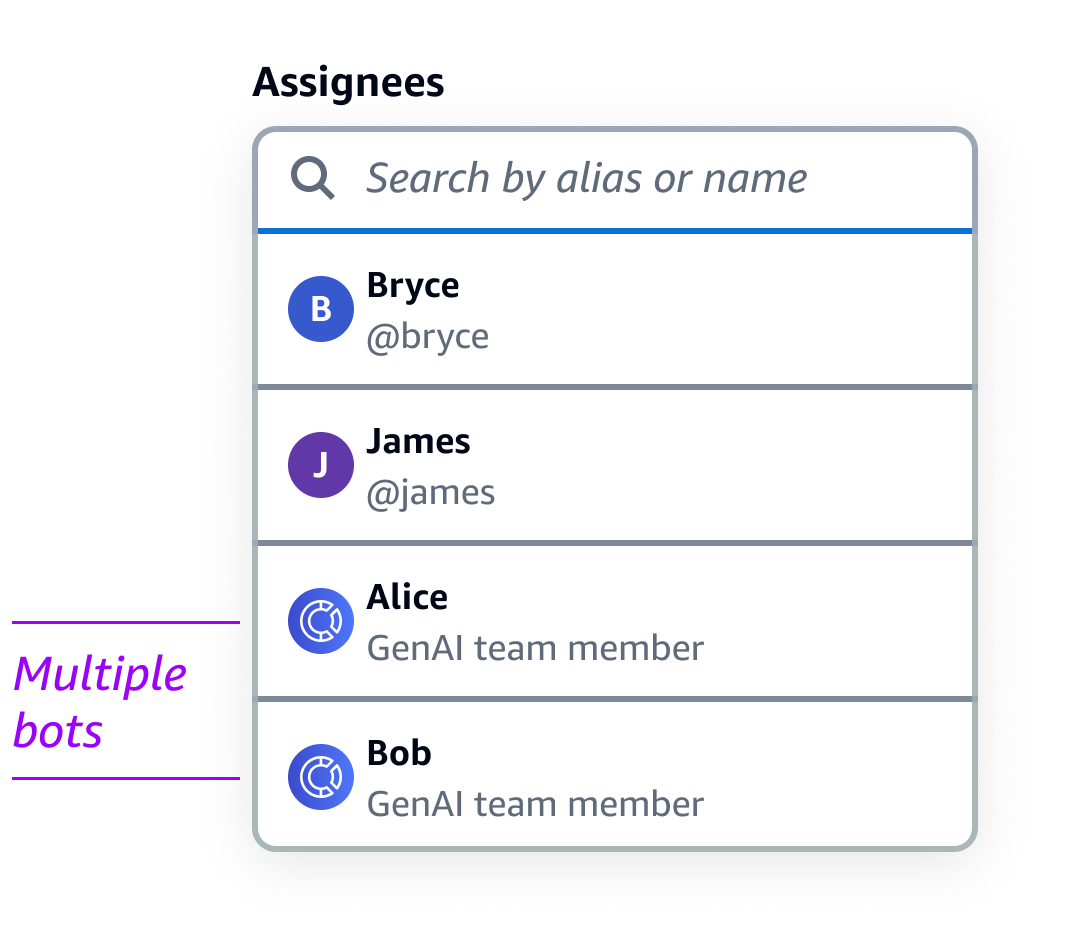
Multiple AI bots created confusion
When presented with several AI assistants, participants struggled to understand how they differed or whether knowledge was shared between them. Most participants said they would simply select the first bot in the list, suggesting that a single assistant would create a clearer experience.
These findings significantly influenced the direction of the feature.
Design Iterations
The research results led to several important design decisions.
Decision 1: AI should be assigned work like a teammate
In early explorations, the AI automatically scanned the issue backlog and began working on tasks it determined it could solve.
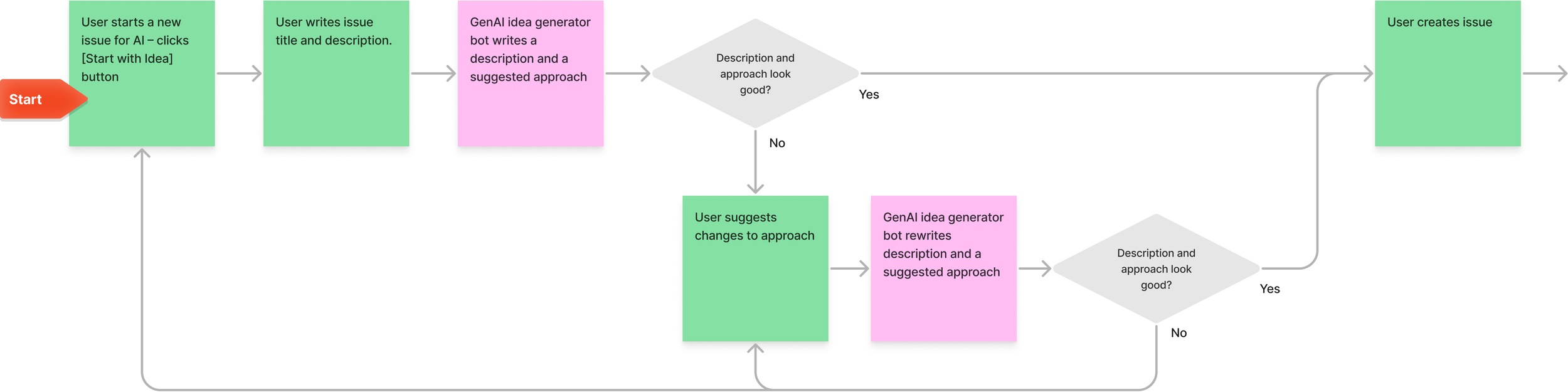
Early version of issue creation flow.
Research participants strongly preferred explicitly assigning work to the AI instead. I redesigned the workflow so developers could assign issues directly to the AI assistant during issue creation.
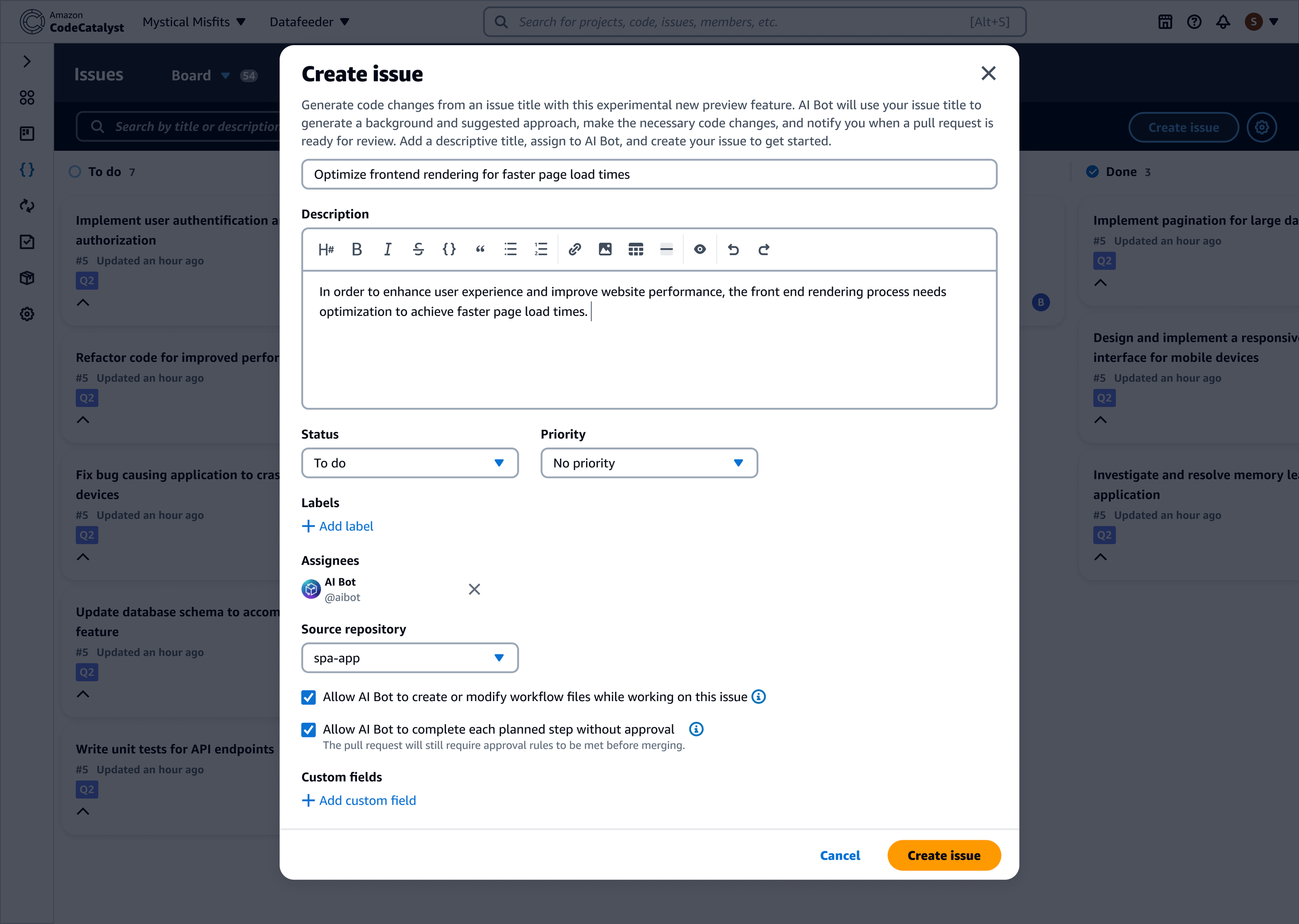
This approach mirrored how developers already delegate work within their teams and reinforced a sense of control.
Decision 2: Reuse existing collaboration patterns
Developers already collaborate through issue comments and pull request discussions. Rather than introducing a new interface for AI interactions, I designed the assistant to communicate through comments within existing workflows.
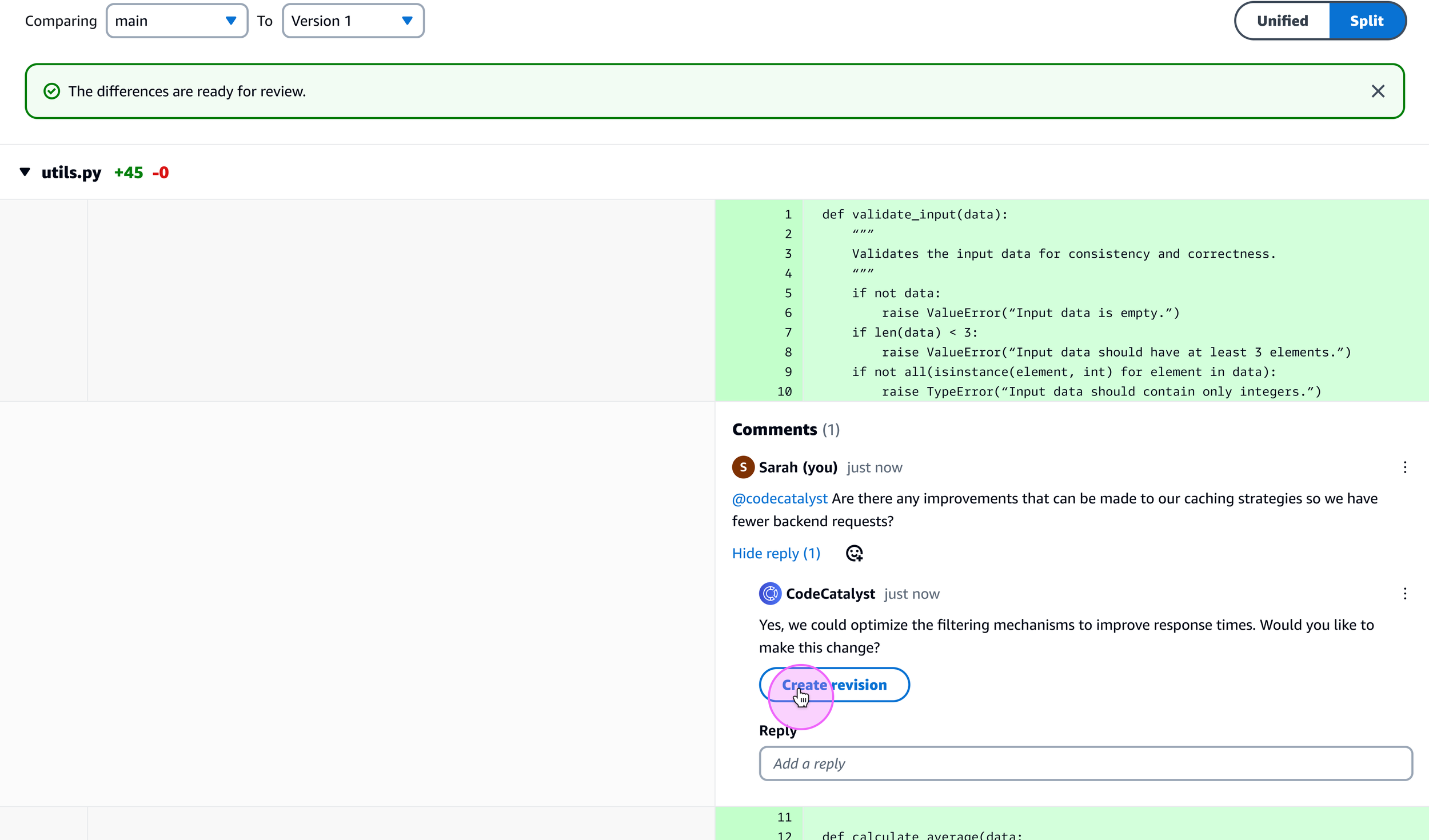
This allowed developers to:
Ask the AI clarifying questions
Request revisions
Approve or reject the AI’s proposed plan
All using familiar interaction patterns.
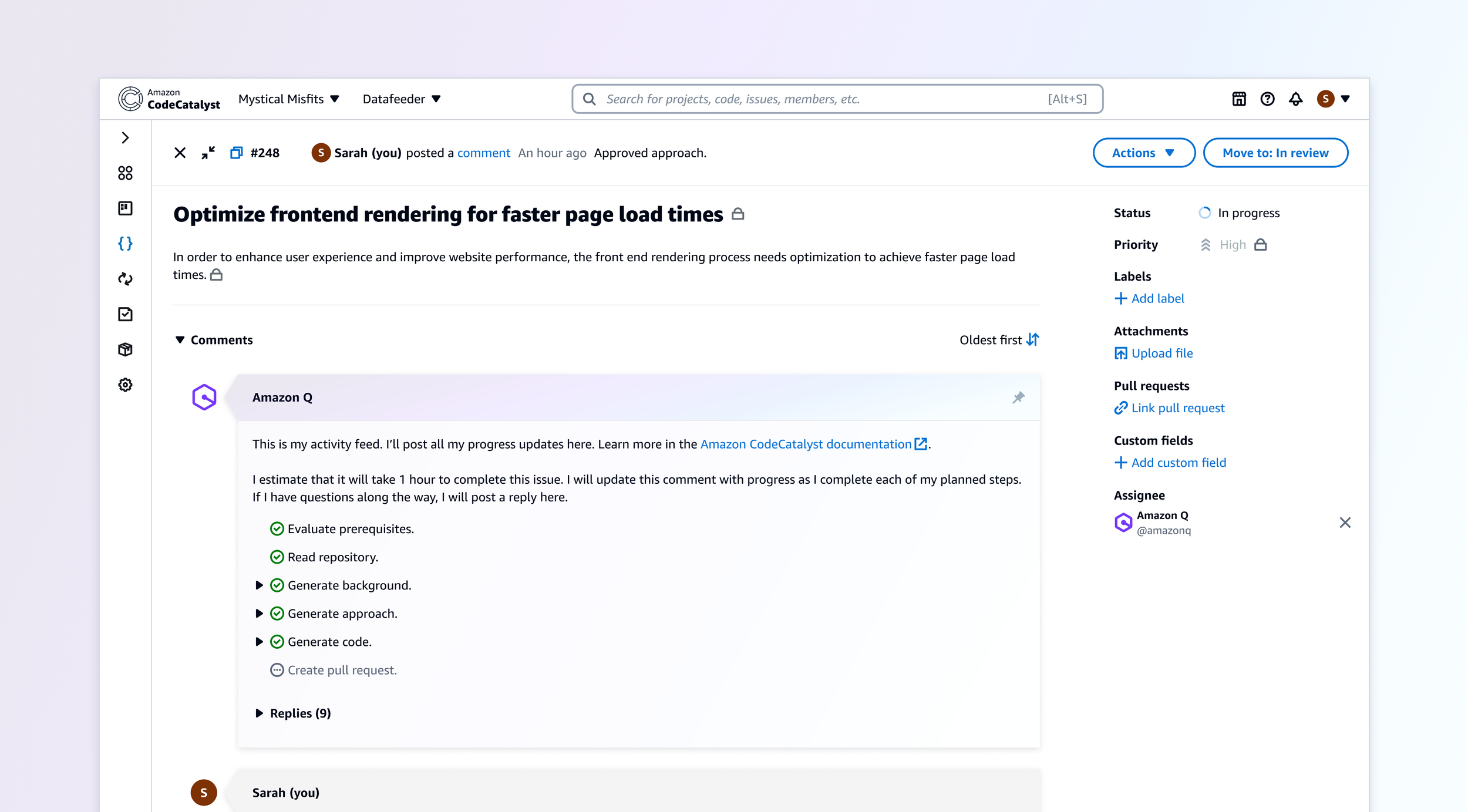
Decision 3: Make AI progress visible
Developers needed clear feedback about what the AI was doing. An early concept included a progress bar embedded within the issue description that would track the AI’s workflow.
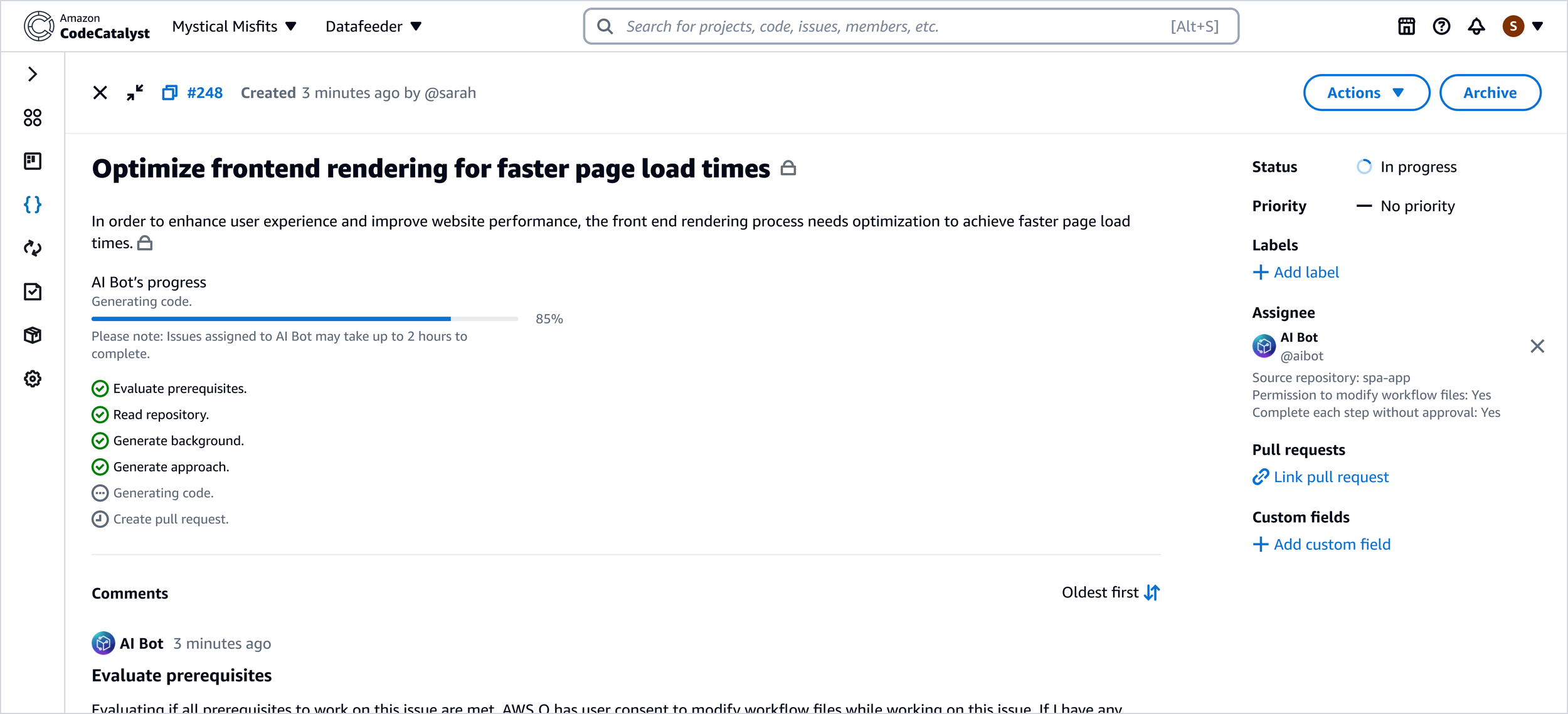
However, technical limitations made it difficult to calculate precise completion percentages, and implementing this feature required engineering work beyond our timeline. As an alternative, I designed a pinned progress comment posted by the AI assistant.
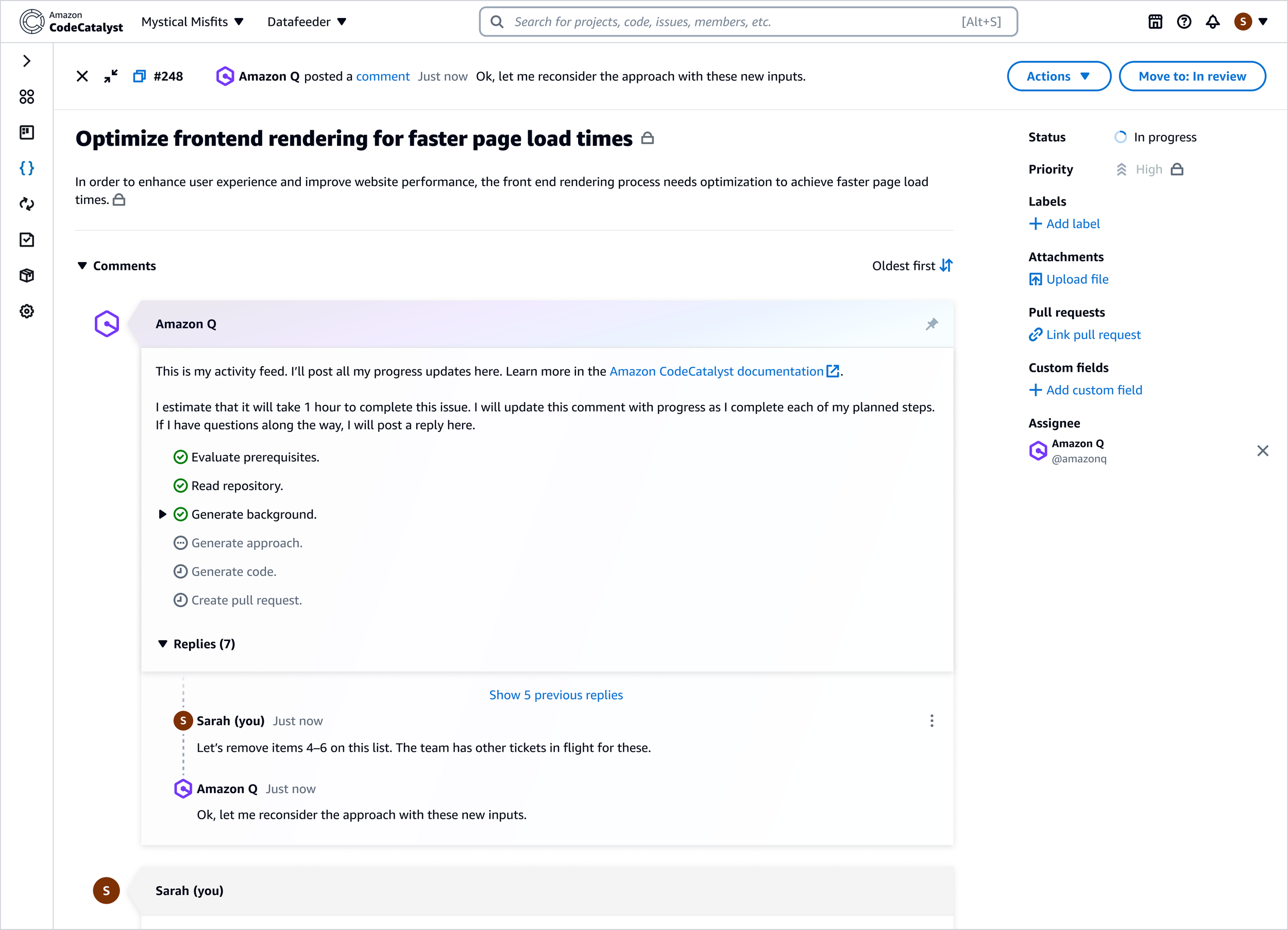
This comment:
Summarized the AI’s current step in the process
Stayed pinned to the top of the comment thread
Served as the central place for follow-up questions or approvals
This solution balanced transparency with engineering feasibility while maintaining the conversational interaction model.
Final Experience
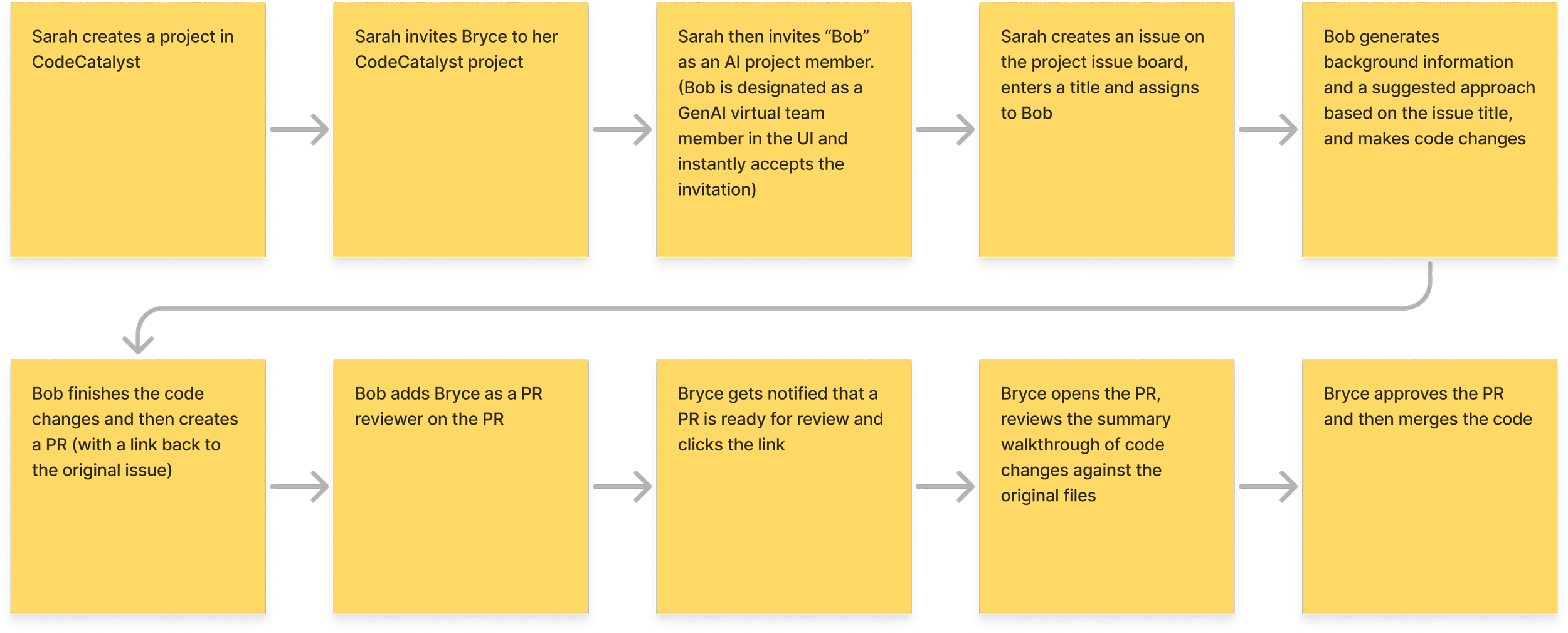
The final workflow allowed developers to:
Create a new issue describing a development task.
Assign the issue to the AI assistant.
Review the AI-generated implementation plan.
Track progress through pinned issue comments.
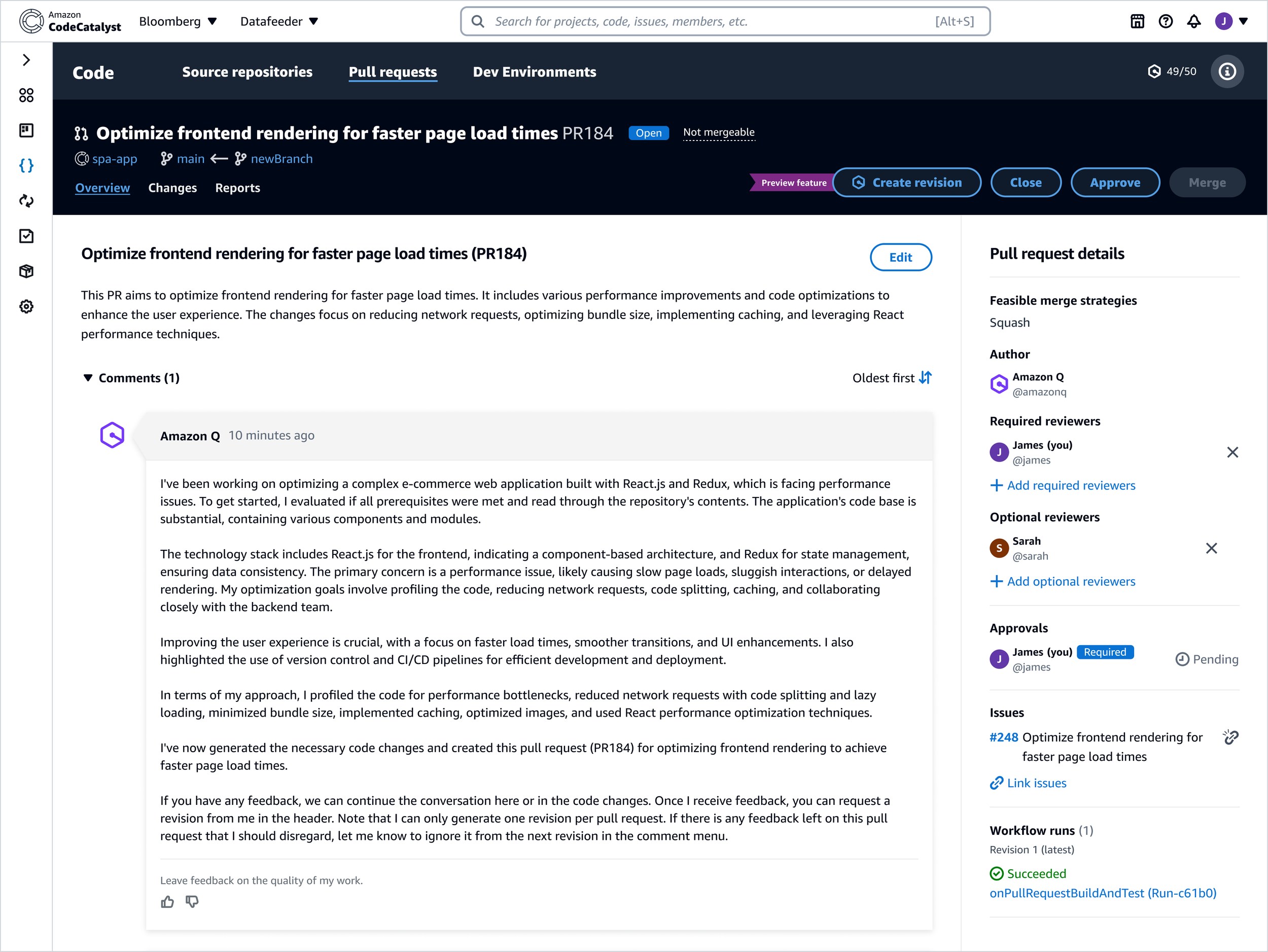
Receive merge-ready code delivered as a pull request.
The AI assistant summarized the generated changes directly within the pull request to help developers quickly review the implementation. From there, developers could request revisions or merge the code into their repository.
Outcome
The feature launched at AWS re:Invent, the company’s annual cloud computing conference, alongside the introduction of Amazon Q, AWS’s generative AI assistant. Developers responded positively to the concept during demonstrations, particularly the idea of delegating smaller coding tasks directly to AI.
However, broader adoption of the feature was limited by two factors:
Many teams already had established DevOps toolchains outside of CodeCatalyst
CodeCatalyst itself had not yet reached feature parity with competing platforms
As a result, the concept behind Idea-to-PR ultimately found stronger traction when integrated into other developer tools.
Reflection
Looking back, two areas stand out as opportunities for improvement.
Reducing workflow friction
In the initial release, developers were required to answer several follow-up questions before the AI could begin work. If they did not immediately return to the issue, the workflow stalled while waiting for input. A future iteration would front-load this information during issue creation so the AI could begin work immediately.
Improving progress visibility
The pinned comment solution worked well within engineering constraints, but richer progress indicators could further improve transparency and developer confidence in the AI’s work.
After this release, my design efforts shifted toward expanding the capabilities of Amazon Q across other AWS developer experiences.